
Court Calendars in Washington
No single calendar covers every Washington trial court. The route you take depends on the court level. It also matters whether you want a future date or a case's history. For District and Municipal Court appearances, use Find My Court Date. For Superior Court settings in 37 Washington counties, use Odyssey Search Hearings. King and Pierce Superior Courts run their own systems. Many individual courts post a local calendar or daily docket of their own.
Washington Courts Case Search serves a different purpose. It identifies the court and the case. It does not give the hearing schedule. The statewide index refreshes within 24 hours. It can hold less detail than a local Washington docket would. Check the county or city calendar next. If a date is missing or unclear, contact the court directly. The county directory routes you to each local Washington court, clerk and coordinator.
The statewide index tells you which court has the case. A local calendar then points you toward the practical next check for a scheduled appearance.
Washington's Find My Court Date
Washington Courts' Find My Court Date form lists future District and Municipal Court appearances. Pick a Washington court. Type the first and last names exactly as they appear on the court papers. Complete the CAPTCHA, and select Search. The dropdown covers lower courts, municipal courts, divisions, violations bureaus, and a Washington Tribal Court option. There is no date-range box and no case-number field.
This is a targeted search, not a posted daily calendar, and it returns no case documents. A blank result needs a second look. Match the selected court to the court named on your citation or notice, then check that court's calendar or call its clerk. The Washington Courts Directory lists local court sites and phone contacts. Case Search can pin down the court when your paperwork is incomplete.
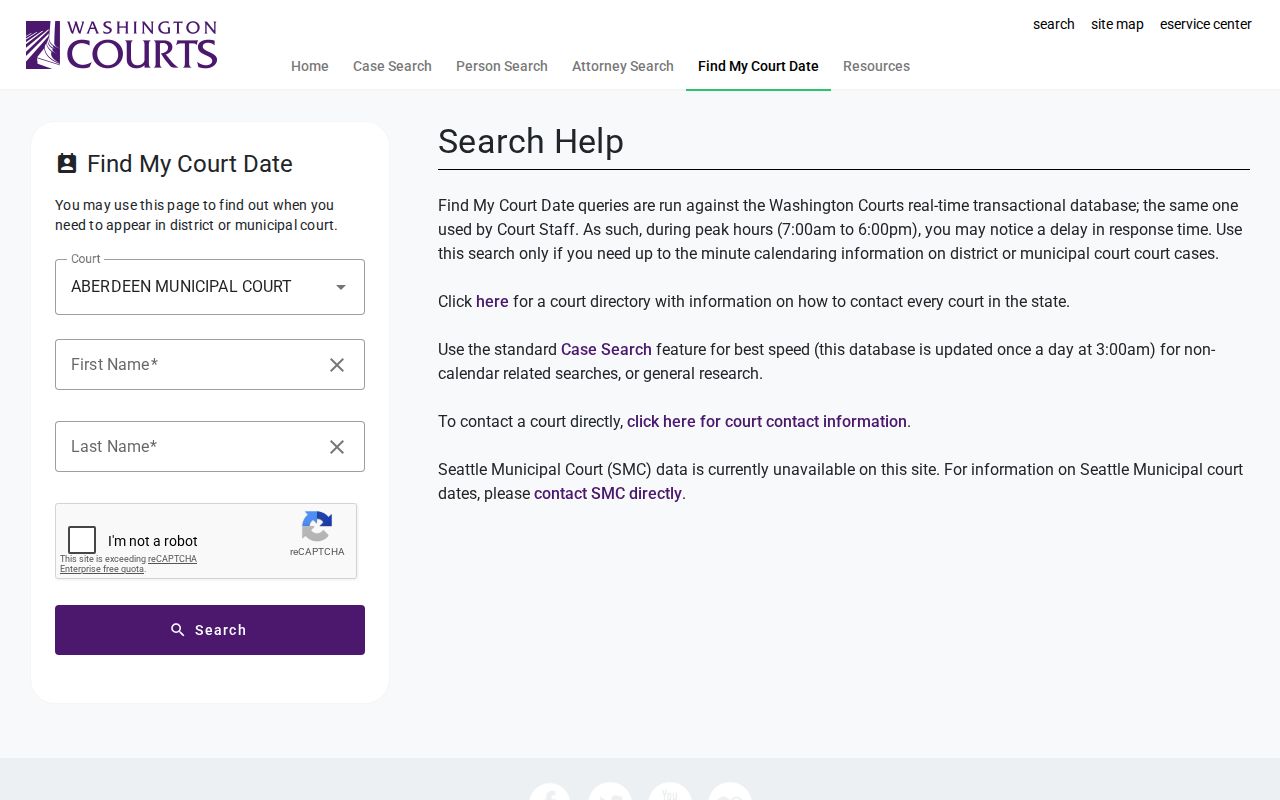
The form asks for the exact court and the exact name from the papers. Both details drive the lookup for a future lower-court appearance.
Finding a Washington Court Date
Work from a broad search toward the court that can actually confirm a setting. Each level of court in Washington uses its own channel. The county clerk or coordinator is always the fallback for a current date.
- Read the citation or notice and identify the Washington court level and named court. If unclear, start with Washington Courts Case Search to locate the court and county or city.
- For a future District or Municipal appearance in Washington, choose the exact court in Find My Court Date, enter the names from the papers, complete CAPTCHA and search.
- For Washington Superior Court, check its local calendar or Odyssey Search Hearings where the county uses Odyssey. King and Pierce use separate Superior Court systems.
- Open the Washington county or city court's online docket/calendar from the official Court Directory. If that court posts a daily printed docket, compare it with current online information.
- Call the Washington clerk or court coordinator when a date is missing or changed. Ask which setting is current and whether a new notice or order was entered.
- If needed, visit a Washington courthouse counter or public terminal to check the local record and ask how that court publishes its calendar.
The Washington county directory turns a statewide result into a local court website. A county calendar often shows more than Washington's state index does. When the two conflict, trust the latest court notice. A coordinator's confirmation works too. Keep the notice that names the court and date. A clerk can then compare it with later docket entries.
Washington Odyssey Hearing Search
Washington's Odyssey Search Hearings is separate from Smart Search. In a participating Superior Court county, select that county or all participating Washington courts. Next, pick a hearing category. Options are Civil, Criminal, Family, Probate or Mental Health. Search by case number or party name. Business name, attorney name or bar number, judicial officer, and courtroom also work. The criteria fields change with the type. The form also accepts a date-from/date-to range and a CAPTCHA.
Results appear in list or calendar view and link back to the Register of Actions. AOC's March 2026 guide lists what each result shows. You get case number, style or defendant, case type, date and time, hearing type, judge, courtroom and case category. The illustrated training result warns that more hearings may exist and suggests narrowing the search. Treat it as a caution, not proof that every setting is listed.
Scope matters here. Odyssey covers Superior Court in 37 counties only. It excludes King and Pierce Superior Court, and it excludes District and Municipal Courts. AOC publishes no universal hours, maximum date span or export guarantee. For a date outside that scope, check the local Washington calendar or call its coordinator.
Reading a Washington Court Setting
A Washington calendar entry is a scheduled event, nothing more. It is not a complete case explanation. The setting may surface in several places. These include a local calendar, an Odyssey result, a notice, or the case's Events and Hearings or Register of Actions area. Fields vary by Washington court and system, so verify the details rather than assuming every statewide result carries them.
| Date and time | The Washington setting's scheduled day and start time. Check the newest notice because a later entry may replace it. |
|---|---|
| Court and location | The Washington court and county or city. Select the exact lower court; Superior calendars are local or in Odyssey where available. |
| Courtroom | A Washington local calendar or Odyssey result may show the room. Remote appearance directions are court-specific. |
| Judge or judicial officer | A Washington local calendar or Odyssey may list one. The statewide case index does not guarantee this field. |
| Setting type | The event's purpose, such as arraignment, pretrial, motion, trial, sentencing, review, contested infraction or mitigation. Washington labels vary locally. |
Courtroom names and remote appearance instructions are set locally in Washington. Use the current court notice for logistics.
Washington JIS Hearing Codes
Washington publishes no single, exhaustive set of live hearing labels for its courts. Odyssey offers broad search categories. Local calendars name individual events instead. The Washington AOC JIS Code Manual describes JIS-connected District and Municipal Court workflows, but it does not require every court's replacement system or Superior Court calendar to use the same label.
- ARR
- Washington JIS hearing code for arraignment, when the charge is addressed and a plea is entered.
- PTR
- Washington JIS code for a pretrial hearing after a not-guilty plea in a criminal case.
- MTN and MTY
- Motion without testimony and motion with testimony. A generic MOT can be a scheduling placeholder that should be updated to reflect the proceeding held.
- GPS and SEN
- Washington JIS distinguishes a combined guilty plea and sentencing from sentencing after adjudication.
- CON and MIT
- Washington JIS distinguishes a contested infraction from a mitigation request.
These JIS descriptions are not a translation key for every portal. If a local label affects whether you must attend, ask the clerk or coordinator what that court expects. The official Washington JIS hearing-type code list documents the limited-court terms used to set hearings and print calendars.
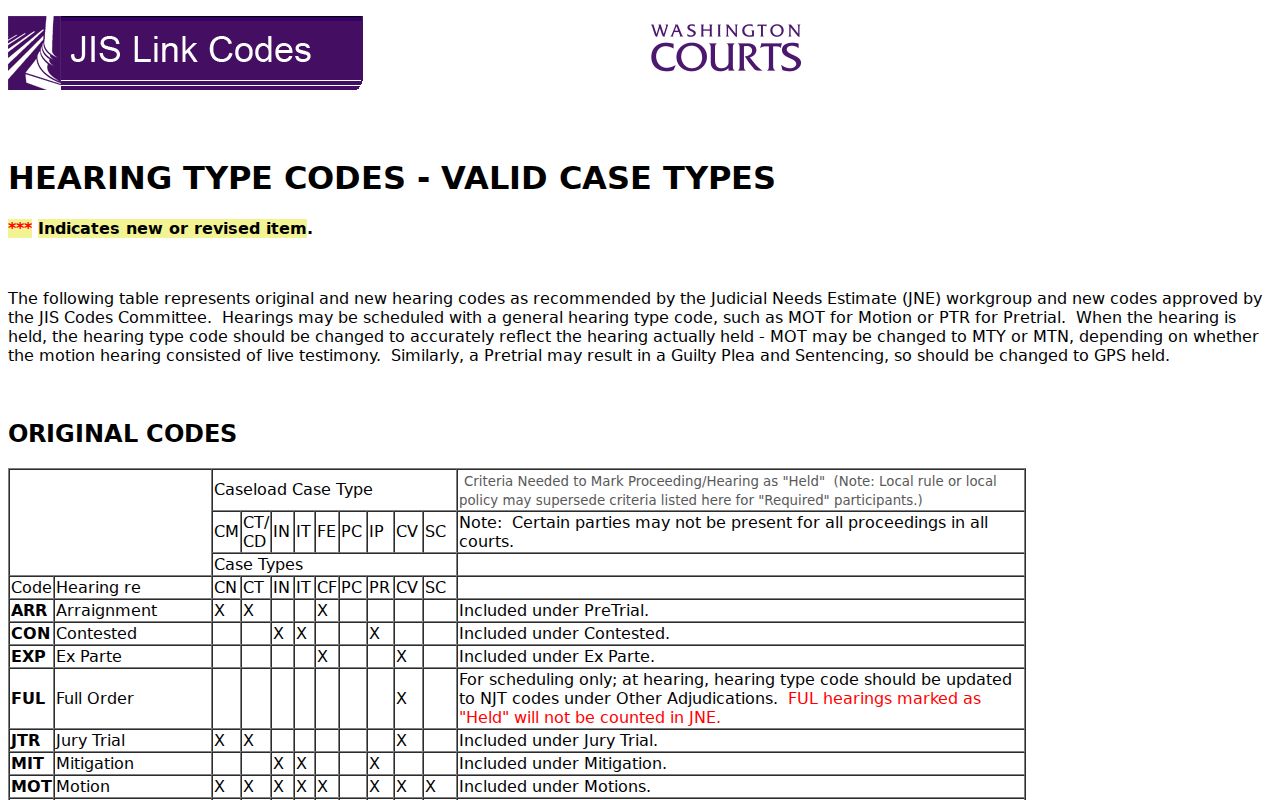
The guide describes JIS workflow only. No court portal is promised to display the same code or label.
Washington Resets and Continuances
A reset or continuance in Washington shifts the hearing date alone. It does not touch the case's status. Because of that, an old calendar row can linger in the docket history. A newer entry carries the true date. Look for the newest entry tied to a Washington court notice. Do not trust an earlier setting. Orders, continuance motions, coordinator notices, and closures are the usual things that move a date.
For weather or emergencies, Washington Courts posts a Court Closures and Emergency Modifications page. Still, a closure notice never overrides the order or local direction controlling a case. When online systems clash, ask the Washington coordinator or clerk which setting stands. Ask whether another notice is coming too.
Keep roles straight here. The clerk keeps the official case record; a coordinator may keep a judge's working calendar. Statewide results can run stale or miss a Superior Court setting. Confirm the active date with the hearing court itself.
Washington Notices, Calendars, and Registers
Each Washington source answers a different question. A notice or order records what the court scheduled or changed. A calendar row locates a future event. The register preserves the event history, including settings that stayed visible after a reset. So a historical entry is not the current instruction to appear.
Set the latest Washington notice beside the local docket or hearings view. No notice available? Ask the coordinator or clerk. Washington Case Search can identify a case and its court. It is not the controlling calendar. When a date is disputed, the hearing court's current instruction settles it.
Note: Washington docket history keeps superseded settings as part of the record. Event order matters when you read dates.
Missing a Washington Court Date
Think a Washington court date slipped by? Act fast. Identify the court and call its coordinator or clerk the same day. Ask whether the hearing went forward. Ask whether a new setting or order was entered, and what steps come next. Public search results can lag, and an older Washington calendar entry may still sit in the history. The local court's notice beats the statewide result every time, so follow that rather than guessing.
If a setting may have been missed:
Check the newest Washington notice, order and local calendar, not only an older result.
Call the Washington coordinator or clerk to confirm case status and the next required step.
If the Washington court or county is unclear, use the case locator and then the county directory.
Reach a Washington Court Coordinator
No statewide calendar office confirms every trial setting in Washington. The Washington Courts Directory fills that gap. It lists local courts and their contacts. Start with the case number or court name. Work out its county or city. Then use the directory entry for the clerk, calendar, or coordinator. Treat the statewide index as reference material; it may lag behind a local update.
The Washington county directory takes you from this overview to the local court site. For a Washington District or Municipal hearing, confirm the court named on your paperwork. For Superior Court, check the local calendar, Odyssey Search Hearings, the King County Clerk portal, or Pierce County LINX. A direct confirmation is the surest fix. Use it to resolve a reset, closure, or conflicting entry.